How to host your first game of Not THAT Button!
Hosting Not THAT Button! is easier than hosting a quiz: the game asks the questions, keeps the scores and runs the clock. You just get everyone in and press go.
1. Set up the big screen
Open notthatbutton.com/tv on the TV or laptop everyone can see. (See How to put the game on your TV.) On Steam, press Start a game on the computer instead.
2. Pair your phone
Open the free app, press Start a game, and type the six-digit code on the big screen, or scan its QR code. Pick a nickname. You're the host.
3. Get your friends in
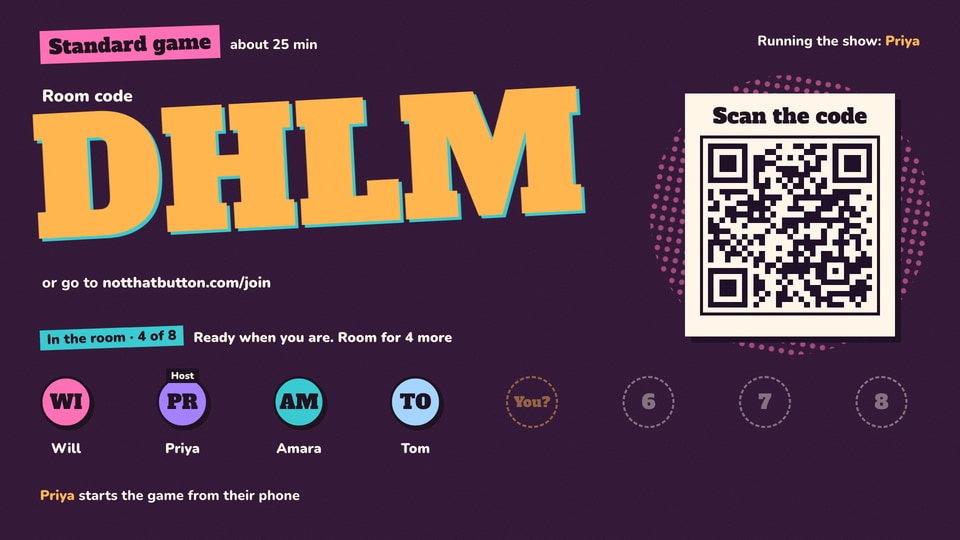
The big screen now shows the room's code: four letters, and a QR code. Your friends:
- open the free app (or scan the QR code with their phone's camera);
- type the four letters, if they didn't scan;
- pick a nickname.
That's it. No accounts, no sign-up. Each one appears on the big screen as they join. You need at least two players, and up to eight can play.
4. Choose a game
On your phone, choose what to play:
- Quicktwo rounds and the finale, for a short game.
- Standarda full game, with a mix of rounds dealt for you.
- Your ownstart from Speed Demons, Brain Teasers or Party Chaos, or build one round by round. (See Make it your show.)
You can also choose the decks the questions come from.
5. Start, and run the show
Press Start. The host introduces the game, and each round explains itself the first time it comes up.
During the game your phone is a buzzer like everyone else's, plus a few host controls: move on, pause, skip a question, or end the game early.
Tips for a first game
- Start with Standard. It shows off a good mix of rounds.
- Let the walkthroughs play. Each round's quick explainer saves a lot of "wait, what do I press?".
- Sit where you can all see the screen. Answers are on your phone, but the questions are up there.
Play Not THAT Button!
The questions play out on the big screen. Everyone buzzes in on their own phone.